

Keyboard-first dashboard
Manage multiple CLI agents from one terminal UI with fast hotkeys for the work that needs attention.


Flowmux for Claude Code, Codex, and OpenCode
Where agent chaos becomes flow.
Keep real CLI sessions visible, organized, and resumable with a keyboard-first dashboard, optional Git worktrees, and tmux-backed persistence.
Quick demo
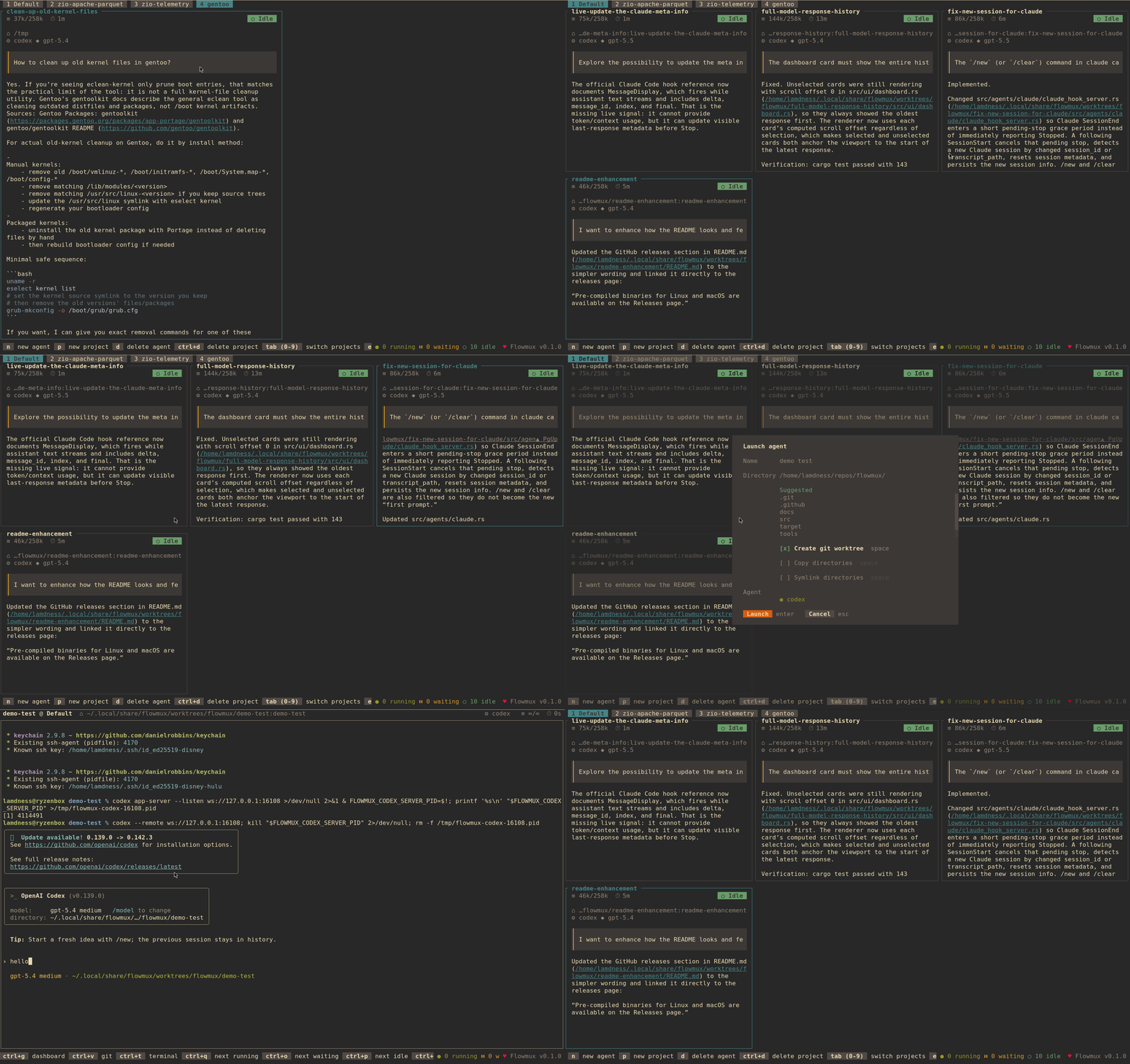
Flowmux keeps the overview quiet: project dashboards, agent status, model information, and response previews are visible without leaving the terminal.
Why Flowmux
Flowmux coordinates real agent CLIs, tmux panes, projects, and Git worktrees while leaving your editor, shell, and Git tools in place.
Manage multiple CLI agents from one terminal UI with fast hotkeys for the work that needs attention.
Flowmux coordinates panes, projects, agents, and worktrees without trying to replace the tools you already trust.
Keep using your preferred editor, git UI, shell, terminal, and command-line utilities around every agent session.
Track running, waiting, and idle agents with model information and latest-response previews in the overview.
Separate work by repo, task, or stream, then give agents their own working directories and optional git worktrees.
Agent, git viewer, and shell views forward keys into live tmux panes instead of wrapping the agent UI.
Saved session state lets Flowmux reconnect to agents after tmux restarts so long-running work is easier to resume.
Built with Ratatui, Tokio, tmux, libghostty-vt, and git2 for a focused terminal application.
Use cases
Give each task its own CLI session and optional Git worktree, then keep an eye on every agent from one dashboard.
Group work by project, repository, or stream so an active experiment never gets mixed into the work that needs to ship.
Flowmux stores session state and reconnects to agents after tmux restarts, keeping long-running work easy to resume.
Typical workflow
Separate work by repo, task, or stream when you want distinct dashboards.
Create agents with separate working directories and optional isolated git worktrees.
Watch running, waiting, and idle agents from the dashboard without opening every terminal.
Move straight to running, waiting, or idle agents when the status changes.
Read output, respond, inspect git state, or open a persistent shell in the agent directory.
Reopen Flowmux and continue from the saved session state after a restart.
Supported agents
 Claude Code
 Codex
Codex Opencode
Flowmux auto-detects Claude Code, Codex, and OpenCode on your PATH, then enables discovered agents by default unless you configure an explicit allowlist.
Install
Best for a quick install on Linux or macOS. The script downloads the latest release, checks for tmux, and installs the binary into your local path without requiring a source checkout.
Requirements: Linux or macOS, tmux, and at least one supported agent CLI.
Free and open source: released under the MIT License.
Prebuilt Linux and macOS binaries are available on GitHub Releases.FAQ
No. Flowmux is built on tmux and adds a keyboard-first dashboard for coordinating agent sessions, projects, and worktrees.
Flowmux auto-detects Claude Code, Codex, and OpenCode installed on your PATH, unless you configure an explicit allowlist.
No. Agent, git viewer, and shell views forward input to live tmux panes, so you keep working with the real command-line sessions.
Yes. When you create an agent, you can give it an isolated Git worktree and working directory.
Flowmux persists session state and can reconnect to agents after tmux restarts, making long-running sessions easier to resume.